





 Review
  Manual▶1
  Adverts▶4
  Magazines▶3
  Maps▶0
  Screenshots▶3
  Covers▶4
  Media▶4
  Videos▶3
  Development▶0
  Cheats▶0
  Walkthrough▶0
  Credits
  Comments▶7
On August 3, 1999, Spectrum Zone, the predecessor of Computer Emuzone [CEZ], was launched. So, we are celebrating our 25th anniversary, and it is worth saying so, even though we have not been able to prepare anything special. We will continue here as long as we can. Thanks for everything!
 download


 info
info

Title: Stop Ball
Genre: Puzzle
Distribution: Commercial
Price: 875 Pts
Price: £1.99
Available Magazines


 ratings
| Rating | Votes |
| 1 | 2 |
| 3 | 1 |
| 6 | 4 |
| 8 | 1 |
| 10 | 1 |

 5.2
5.2

 7.2
7.2

 7.7
7.7
 cez links
IF YOU LIKE IT...


 developing team
Ilustración: Ricardo Machuca
Fotos de pantalla: Manuel Guio
Maquetación: Alberto Flórez-Estrada
Música: DECIBELIOS
+info
In CEZ Zones


In other pages

 commentReview Manual▶1 Adverts▶4 Magazines▶3 Maps▶0 Screenshots▶3 Covers▶4 Media▶4 Videos▶3 Development▶0 Cheats▶0 Walkthrough▶0 Credits Comments▶7
 manual
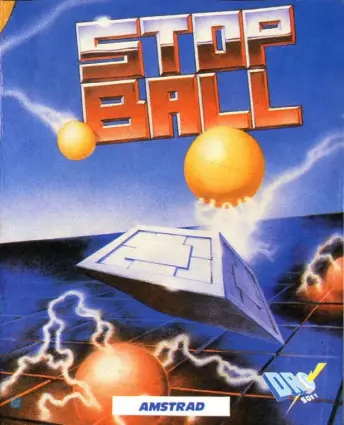
Two mega screens of skill, speed and co-ordination, whose totally different challenges make this almost two games in one. Thirty eight frustrating addictive levels keep you coming back for more. If you can avoid the obstacles and keep the ball in the air then you can progress to the mad maze, with four gates to visit whilst avoiding contact with the bouncing balls.
Keyboard or Joystick
One player only
Program by DRO SOFT.
---------------------------------------------------------------------
There are two types of screens, each with dIfferent objects, these alternate as you play the game.
On the first screen you need to keep the ball up in the air, by manoeuvering your bat so that the ball bounces on the bat rather than on the ground, you can drop a single block at any point on the grid where you think the hall will bounce so that you can cover the other areas of the grid. You do this by pressing fire.
When the time runs out you move onto the next screen, this is of the second type, here you score points for visiting the gates that are situated in the corners, and in the form of a cross in the centre.
You die if you collide with any of the balls that are bouncing around.
When you have visited each of the four corners, you move onto the next screen.
The third screen is the same type as the first, except now there are obstacles for you to avoid. Play continues in this fashion with the two screen types alternating and getting more complex and challenging.
If you achieve a high score you can type your name into the high score table, press Enter at the end of your name.
LOADING INSTRUCTIONS
Type LOAD "" and press ENTER.
CONTROLS
To select Sinclair Joystick press L.
To select Kempston Joystick press ENTER and L.
Or use the keys
UP: 0
LEFT: K
RIGHT: ENTER
FIRE: L
Press Fire to start play.
Keyboard or Joystick
One player only
Program by DRO SOFT.
---------------------------------------------------------------------
There are two types of screens, each with dIfferent objects, these alternate as you play the game.
On the first screen you need to keep the ball up in the air, by manoeuvering your bat so that the ball bounces on the bat rather than on the ground, you can drop a single block at any point on the grid where you think the hall will bounce so that you can cover the other areas of the grid. You do this by pressing fire.
When the time runs out you move onto the next screen, this is of the second type, here you score points for visiting the gates that are situated in the corners, and in the form of a cross in the centre.
You die if you collide with any of the balls that are bouncing around.
When you have visited each of the four corners, you move onto the next screen.
The third screen is the same type as the first, except now there are obstacles for you to avoid. Play continues in this fashion with the two screen types alternating and getting more complex and challenging.
If you achieve a high score you can type your name into the high score table, press Enter at the end of your name.
LOADING INSTRUCTIONS
Type LOAD "" and press ENTER.
CONTROLS
To select Sinclair Joystick press L.
To select Kempston Joystick press ENTER and L.
Or use the keys
UP: 0
LEFT: K
RIGHT: ENTER
FIRE: L
Press Fire to start play.
 screenshots
Spectrum

Amstrad CPC

MSX


