





HISTORY
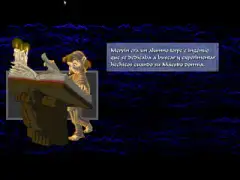
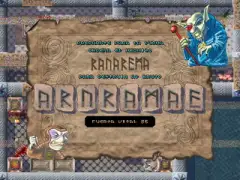
Totum castle was a white magic school where pupils and teachers lived together. Mervin was a clumsy and naive student who used to search and practice spells while his Master slept.
One night he chose a potion that would make him wise, tall and irresistible to girls, but he made a mistake. Mervin simply turned into a frog. He lamented his error and broke into tears.
Due to the noise his Master came in and discovered the mischief: Mervin! You deserve the worst punishment! Suddenly, a flash pierced his Master from side to side, leaving him lifeless in an instant. Mervin hid thanks to his small size and saw how a Black Warlocks sect and their dark army invaded the castle killing every living being.
They'll pay for this! With my magic knowledge I'll get rid of them in an instant! But he knew it wasn't that easy, so he looked into his Master pockets and found 8 magic stones and a scroll.
The word "RANAREMA" was written in the scroll, and it could be formed with the stones. Will this be useful? he asked himself. And with that dubious weapon, he swore to avenge all that death and destruction.
THE CASTLE
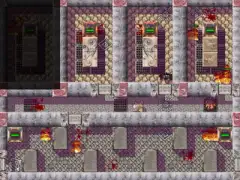
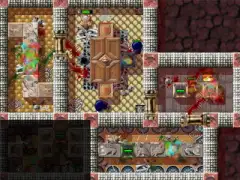
The Totum castle is divided into eight floors consisting of a labyrinth of rooms.
After the invasion sorcerers plunged every level into darkness, so it will Mervin shedding light on the rooms that he enters. Also the doors between rooms are hidden and only appear when you pass along them or with a spell.
To move from one floor to another there is a whole network of elevators that can be used freely. If you decide to move from one level to another, keep in mind that as you go deeper, more dangers lurk there.
When you destroy all the Warlocks of a level, the light changes color gradually, although many rooms may remain hidden.
THE SPELLS
In order to progress through the game you have the help of four types of spells in addition to the stones that form RANAREMA that you picked up from your master.
You can cast spells at any time by pushing the button MAGIC if you aren't placed over a magical gliph.
The spells types are POWER, DEFENSE, ATTACK and EFFECT.
POWER: It defines the amount of energy available to move, defend, attack and cast EFFECT spells. The higher the level, the more power you have. Mervin initially has a level 2 POWER spell. When you loose all the energy of a POWER spell of level greater than 1, you cast automatically a level 1 POWER spell (called "mortal") and you need to cast another higher level POWER spell. If you loose the energy of "mortal" spell, Mervin will die.
ATTACK: ATTACK spell is used to destroy enemies, nests and chests. This spell uses the force from POWER spell therefore ATTACK spell should not be used as crazy because it may drain all your energy.
DEFENSE: It is your shield that defends you against enemies and shots. It also uses the power of the POWER spell. This spell defends you from the side effects of the EFFECT spell, therefore, check the spells' level.
EFFECT: It is a special spell that helps in some moments of the adventure. These spells can open doors, act as a radar that finds Black Warlocks, invoke allies, etc. The inventory's window shows an explanation of each of them. Before you cast a spell, make sure you have enough POWER and DEFENSE level spells to support it.
HELP
You are not alone in the adventure, there are some aids distributed around the castle, it's actually white magic that the Masters made before they died.
Teachers drawn on the floor some magical figures that only you can be over them. Gliphs are activated by pressing MAGIC button when you are over them.
ELEVATOR: (Two concentric diamonds) Shows the outline of floors of the castle and the active lift.
INVENTORY: (Inverted triangle inside a circle) Shows the spells inventory, statistics and runes that we have to be able to acquire new spells.
MAP: (Eye) Shows a map of the active level. Only the rooms we've previously visited can be seen.
EXPLOSION: (Sun) Generates a series of explosions in the room attacking to everybody and everything except you (can be used just once).
REGENERATION: (Fist) Just by being on it, automatically increases your power gradually.
ETERNAL FIRE: (Flame) Makes the EXPLOSION gliphs appear again.
REMINDER: (Hourglass) Lets you save and retrieve games.
RUNES
The runes are magical stones that can be found throughout the castle: into chests and killing Warlocks. You need to hurry to pick them because they disappear after a short time.
You can buy spells with runes on the inventory and doing so you'll advance your magic level.
WARLOCKS
Warlocks are your most powerful enemies and the target of your revenge. There are five Warlocks per level, placed randomly at the start of each game and they move around the map. The warlocks of deeper floors are the most dangerous.
You can recognize them because they laugh and flash in red, as soon as you enter into the area where they are.
You must kill all five Warlocks of the eight floors of the castle to reach the end the game ... or maybe not, fate has many twists.
ENEMIES AND THEIRS NESTS
Warlocks brought to an army of evil creatures that completely invaded the castle. All of these soldiers arrived at the castle through some portals or nests that have been distributed in every room.
The nests are generating enemies regularly. When they are destroyed they loose part of their regenerative capacity. It's convenient to clear the room nests, as it will give you a break in your walking through the maze.
Nests can not be passed through, we have to destroy them since they represent destructible obstacles. All nests and enemies have an energy meter that is visible at intervals.
Nests are always square with a grate on top and you can see that something moves inside. When they are broken dissapears and leave a hole in the ground quite recognizable. When a nest is about to generate an enemy it begins to throw some kind of smoke a few seconds before.
INSTALATION
WARNING
The first step is the installation of JRE that is not deployed into this package and it needs to be downloaded from Sun's site.
CHECKING JAVA RUNTIME ENVIRONMENT (JRE) (multiplatform)
It's safe to check the JRE before trying to run the game.
* Open a system commandline. (in Windows: Start > execute > cmd).
* Write and execute the next command (without quotes): "java -version"
* It will write a text like this:
java version "1.6.0_02"
Java(TM) SE Runtime Environment (build 1.6.0_02-b06)
Java HotSpot(TM) Client VM (build 1.6.0_02-b06, mixed mode)
* The minimun version required is "1.5.11"
* If you get an error message or another version is installed instead of Java HotSpot, you need to download and install the correct JRE accesing the URL:http://java.sun.com/javase/downloads/index.jsp and choosing the current version of "Java Runtime Environment (JRE)".
* When JRE is installed, check again the JRE version as above.
WINDOWS:
No installation required. Unzip the file in the harddisk at any folder.
To run the game you can execute "Ranaremake.exe" or "ranaremake.bat".
LINUX & MAC:
No installation required. Unzip the file in the harddisk at any folder.
To run the game execute the script "ranaremake.linux".
WARNING: It's possible that you need to change the script file security to grant execution permission. Follow your own O.S. procedures.
ADITIONAL PARAMETERS OF ranaremake.bat/linux
When the game is executed by scripts (.bat in Windows and .linux in other O.S.) there are two parameters that let you choose the graphic mode. The parameters need to be written next to the script, separated by spaces and without quotes:
- "window" : Forces the execution in window mode.
- "java2d" : Forces the execution without graphic acceleration.





Equipo de pruebas: Edge, Mandrake_El_Mago, Onofre, [c|-|e]
Probadores adicionales (por orden alfabético): anjuel, AugustoRuiz, Babul, sus hijos, Benway, Caranim, Davidcm, Iforeve, Jovo, Karnevi, Kendroock, Konamito, LordFred, Metalbrain, na_th_an, Sejuan, The Punisher, WYZ, Zemman, Zikitrake